Reviewed by Ottmega Editorial Team • Last updated Oct 8, 2026
IPTV Smarters Pro for FireStick — How to Install & Use (2025)
Introduction
IPTV Smarters Pro remains one of the most popular IPTV players for FireStick and Fire TV devices in 2025. Although it doesn’t host any content, this app allows you to stream channels, movies, series, and live TV from IPTV services that support M3U playlists or Xtream Codes API.
Since IPTV Smarters Pro is not available in the Amazon App Store, most users sideload it using the Downloader app. This guide will show you exactly how to install IPTV Smarters Pro on FireStick, set it up, use it safely, and explore its features.
The steps below work on FireStick 4K, FireStick 4K Max, FireStick Lite, Fire TV Cube, and FireOS-powered Smart TVs.
What Is IPTV Smarters Pro? (Explained Simply)
IPTV Smarters Pro is an IPTV player, not a content provider. It lets you log in with your IPTV service subscription and stream what that service offers.
Key Facts
-
IPTV Smarters doesn’t offer or host channels.
-
You need an active IPTV service subscription.
-
Works with M3U playlists, Xtreme Codes API, and local playlist files.
-
Supports multi-screen, catch-up TV, EPG, parental controls, and more.
-
Available free with optional paid upgrades.
Who Is It For?
Anyone who wants:
-
A clean, modern IPTV interface
-
Ability to combine multiple IPTV subscriptions
-
Better management features than most IPTV apps
Is IPTV Smarters Pro Safe & Legal?
Because Smarters Pro is available in the Google Play Store and Apple App Store, the app itself is safe.
However:
Safety and Legality Notes
-
The app is legal, but your IPTV source determines legality.
-
Using unverified IPTV services may carry legal risks depending on your region.
-
Always stream from licensed and verified IPTV providers.
Pro Tip: Use a VPN
Your ISP and third-party trackers may monitor your activity. Many users prefer a VPN to protect privacy and reduce buffering.
How to Install IPTV Smarters Pro on FireStick (2025 Updated Guide)
Since Smarters Pro is not on the Amazon Store, we install it using Downloader.
Before You Begin: Enable App Sideloading
-
Go to Settings on your FireStick.
-
Select My Fire TV.
-
Open Developer Options.
-
Choose Install Unknown Apps.
-
Enable it for Downloader.
If Developer Options are hidden:
-
Go to Settings > My Fire TV > About
-
Highlight Fire TV Stick and press the remote’s center button 7 times
-
Developer Options will now appear
Step-by-Step: Install IPTV Smarters Pro via Downloader
Open the Downloader app. Click the URL text box on the right side (make sure the Home option in the left menu is selected).
Note: When you run this app for the first time, a set of prompts will appear. Dismiss them until you see the following screen.
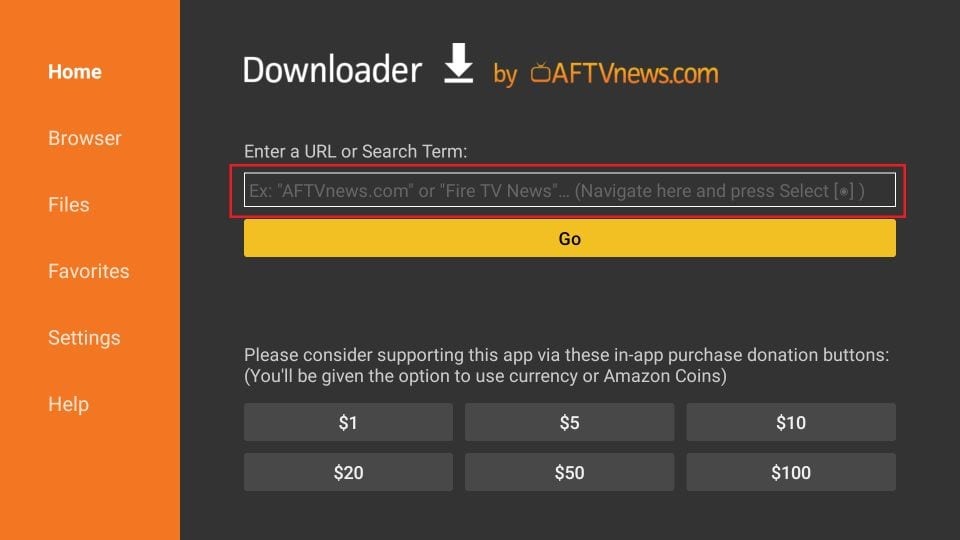
Enter the following 224877 and click GO. Then click the download link on the page that loads
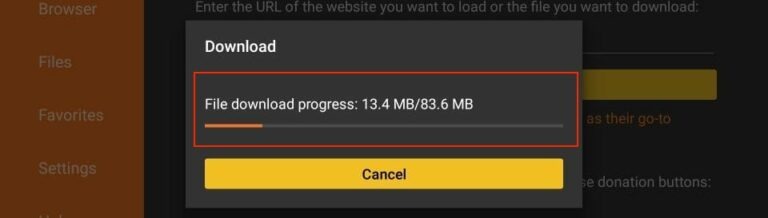
Download the IPTV Smarters Pro APK.
When prompted, select Install.
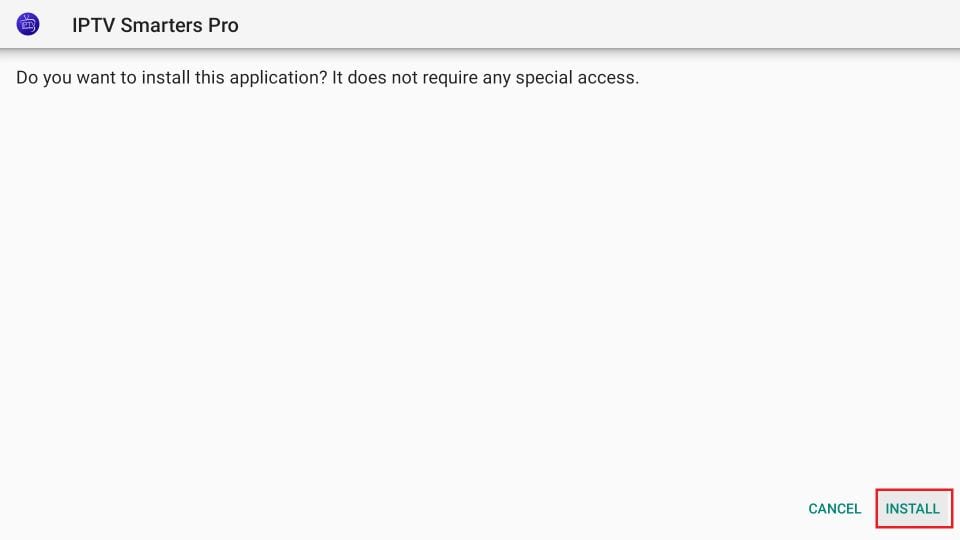
Wait for the installation to finish.
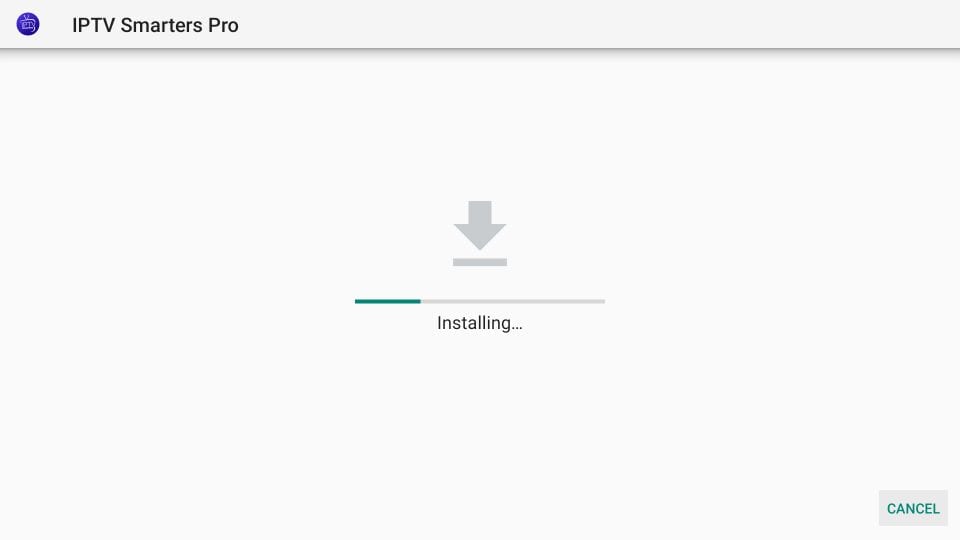
The installation is concluded, and the app installation notification appears. You may now click OPEN to start using IPTV Smarters. I recommend selecting DONE to delete the APK file and free up space on the FireStick storage.
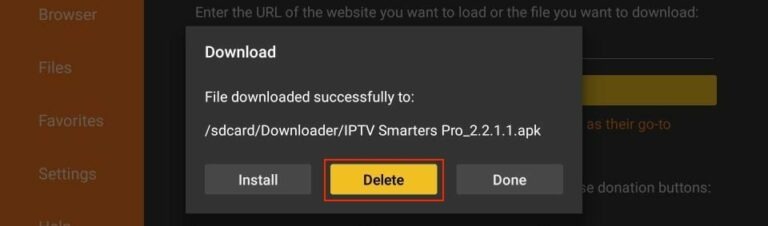
If you click DONE above, you will return to the Downloader interface.
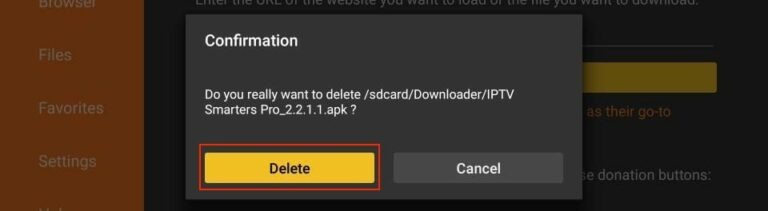
Click Delete.
You now have IPTV Smarters Pro installed on your FireStick.
How to Use IPTV Smarters Pro on FireStick
When you open Smarters Pro for the first time, accept the Terms of Use. The home screen offers several login options.
IPTV Smarters Login Methods
1. M3U Playlist URL
Most IPTV services provide M3U links.
Steps:
-
Select Load Your Playlist or File/URL.
-
Choose M3U URL.
-
Enter any playlist name.
-
Enter your M3U link.
-
Click Add User.
2. Xtream Codes API
Simpler and shorter than M3U URLs.
Steps:
-
Select Login with Xtream Codes API.
-
Enter:
-
Any profile name
-
Username
-
Password
-
API URL from your provider
-
-
Click Add User.
Note: Some IPTV services no longer support Xtream Codes due to past shutdowns.
Exploring Features of IPTV Smarters Pro
IPTV Smarters Pro packs multiple premium-grade features that most IPTV apps don’t offer.
Main Features
-
Multi-screen support
-
Built-in video player
-
EPG program guide
-
Catch-up TV (if your IPTV service supports it)
-
Parental controls
-
Picture-in-Picture mode
-
Recording support
-
Account switching for multiple IPTV providers
-
Supports external players (e.g., VLC)
Supported Devices
-
FireStick & Fire TV
-
Android TV Boxes
-
Android Smart TVs
-
Android phones & tablets
-
iOS (iPhone, iPad)
-
Some smart TVs (Samsung/Tizen & LG/WebOS with different app versions)
Comparison Table: IPTV Smarters Pro vs. Other IPTV Players
| Feature | IPTV Smarters Pro | TiviMate | Smart IPTV |
|---|---|---|---|
| Free Version | Yes | Limited | No |
| Multi-Account Support | Yes | Yes | No |
| EPG Support | Yes | Yes | Yes |
| App Store Availability | Android/iOS | Android | None |
| FireStick Install | Sideload | Sideload | Sideload |
| Interface | Modern | Advanced | Basic |
| Paid Version | Optional | Required | One-time activation |
How to Install IPTV Smarters on Android Devices
Android TV & Android Phones
-
Open the Google Play Store.
-
Search for Smarters Pro.
-
Install it normally.
How to Install IPTV Smarters on iOS (iPhone/iPad)
-
Open the Apple App Store.
-
Search for Smarters Pro.
-
Download and install.
Use your IPTV subscription details to log in on any device.
Tips for the Best IPTV Smarters Experience
1. Use a High-Quality IPTV Provider
Your viewing experience depends entirely on your IPTV service’s quality.
2. Enable Hardware Acceleration
This improves video playback on FireStick.
3. Keep the App Updated
Smarters Pro frequently updates features and compatibility.
4. Use a VPN for Privacy
Helps avoid buffering and protects your streaming activity.
Conclusion
IPTV Smarters Pro for FireStick is one of the best IPTV players to manage and stream IPTV subscriptions in 2025. With M3U and Xtream Codes support, an intuitive interface, and multi-device compatibility, it offers flexibility and convenience for IPTV users. By following this guide, you can easily install IPTV Smarters Pro on FireStick and start streaming in minutes.
Top Recommended Plans & Subscriptions
Verified subscriptions with instant WhatsApp activation & 24/7 replacement warranty from India's #1 trusted OTT seller.